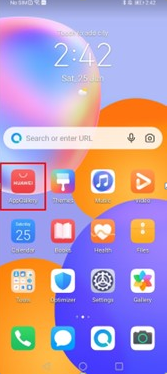
There is a reason Shopee shows up on nearly every phone in Southeast Asia: it brings pet food, furniture, stickers, clothes, home appliances, gadgets — anything worth buying — into a single app. Huawei users sometimes assume their devices sit outside that circle because of the missing Google services, but the assumption is outdated. Shopee is available through AppGallery, and the official Huawei Shopee tutorial on the HUAWEI Community reduces the whole process to three easy steps. Here is what each one involves.
Before You Start
Nothing needs to be prepared in advance. AppGallery, the store the installation runs through, is Huawei’s official app marketplace and comes pre-installed on the device. There is no account to link, no file to sideload, and no setting to change — the starting point is simply the AppGallery icon on the home screen.
The Three Steps
Step one: go to AppGallery on your home screen. Step two: type in SHOPEE on the search bar, click INSTALL, and wait for it to install. Step three: tap the OPEN button on the app and you are ready to go. That is the entire procedure as documented for Huawei Shopee — a download from the official store, with no intermediate steps and nothing to verify afterwards, because the listing comes straight from the marketplace Huawei maintains for its own devices.
After the Install: Shopping as Usual
Tapping OPEN is the handoff from installation to shopping. From that point the app is the same one-stop shop users know from other devices — everything from home appliances to small random finds, browsable and orderable from the phone. The official guide closes with “happy shopping,” and that is genuinely all the setup there is.
See also: The Software Development Life Cycle Explained
One Store for Everything Else
The pattern behind this installation is worth remembering: whenever a new app is needed on a Huawei device, AppGallery is the first place to check, because it handles the download and the installation in the same official way. The community tutorials — including the one covering Huawei Shopee — document these routes step by step, and Huawei customer support is available when questions go beyond them. Three steps, one official store, and Shopee is on the phone.